

WhatsApp offers a feature to lock your chats and keep them private. But even when locked, they remain visible in a dedicated section, which can attract attention. Fortunately, there’s a trick to completely hide these locked chats on WhatsApp! Follow our detailed guide to hide them effectively.
Open WhatsApp
Start by opening the WhatsApp app on your phone. However, make sure the app is up to date so you can benefit from the latest privacy features.
Select a chat and lock it

In the Chats tab, find the conversation you want to lock. Then, long-press the chat to display the options, and tap the lock icon. If this option doesn’t appear, you can find it in the chat settings. Follow the instructions to enable the lock using a PIN, password, or your fingerprint.
Access locked chats
Go back to the main WhatsApp screen. Scroll up and tap on “Locked chats on WhatsApp.” You’ll need to enter your password or use your fingerprint to access this section.
Modify lock settings
Once inside the locked chats section on WhatsApp, tap the three dots located at the top right of the screen. Select “Lock settings,” where you’ll find various privacy options.
In these settings, look for the “Secret code” option and tap it to set it up. This step is essential to enable the feature that hides locked chats.
Create a secret code

Enter a unique secret code that will allow you to hide and retrieve your locked chats. Make sure it’s easy to remember but hard to guess to ensure optimal security. You’ll need to confirm this code by entering it a second time.
Enable hidden mode
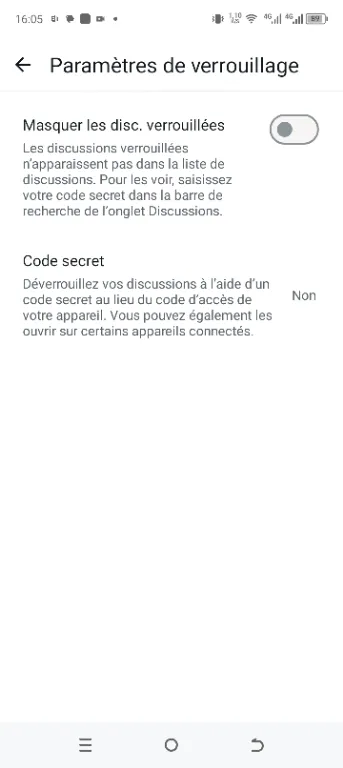
In the lock settings, enable the “Hide locked chats” option. Then, tap “Use my secret code” to make your locked chats completely invisible. However, once this option is activated, the locked chats section will disappear from your main screen.
Check that locked chats are hidden
Go back to the main Chats tab and notice that the “Locked chats” section is no longer visible. This means your conversations are now completely hidden.
How to find your locked chats again?

In short, if you want to view your hidden conversations, here’s how to proceed:
Open WhatsApp and go to the Chats tab. Then, use the search bar at the top of the screen and enter your secret code. Once the code is entered, the “Locked chats” section will reappear. Finally, tap it to access your protected conversations.
Thanks to this detailed method, you can completely hide your private chats on WhatsApp and ensure their confidentiality. Whether you want to protect personal conversations or simply avoid prying eyes, this feature is an excellent way to strengthen your digital security.
See also:
Hide apps with X Icon Changer
05 secret codes to dial on your phone
Watch videos offline on TikTok
Share this content: