

Updated on November 9, 2026
This article contains affiliate links: if you buy through them, Wanda-techs earns a commission at no extra cost to you.
TikTok keeps crashing: the app closes on its own, freezes on a black screen or refuses likes and follows. According to user reports, the cause is most often an old version of the app, full storage, the network or a limit placed on the account. Allow about fifteen minutes to test everything.
Common symptoms and causes
TikTok does not confirm any of these causes. They are the leads users report.
- The app closes by itself or freezes at launch: an old version of TikTok, a cluttered cache or a phone with almost no storage left.
- Black screen or videos that will not load: an unstable Wi-Fi or mobile data connection, or a TikTok server outage.
- You cannot like, comment or follow: a temporary anti-spam limit or a restriction on the account.
- Only direct messages fail to send: that case has its own guide, fixing TikTok message sending and receiving problems.
Before you start
- Check whether it is a general outage: ask a friend whether TikTok works for them or, as a rough indication, open tiktok.com in a browser.
- Try another connection: switch from Wi-Fi to mobile data, or the other way round.
- On Android, find out which navigation mode you use: gestures (swipes) or three buttons at the bottom of the screen. Closing apps differs between them.
- Android settings menus change from one manufacturer to another, so the labels on your phone may differ a little.
Warning: some steps in solutions 3 and 4 erase data. Back up your drafts and unpublished videos first, because no official source confirms they survive a TikTok cache cleanup. On Android, the Clear storage option permanently deletes all the app’s data from the phone, with no way back.
Solution 1: close TikTok and relaunch it
On Android with gesture navigation:
- Swipe up from the bottom of the screen, hold for a moment, then release: your recent apps appear.
- Swipe the TikTok card up to close it.
Then reopen TikTok from the home screen.
To close everything at once, swipe right in the recent apps view, then tap Clear all on the left. With three-button navigation or on Android Go: tap the recent apps button, then Clear all at the bottom.
On iPhone, users describe a similar gesture: swipe up from the bottom of the screen, hold for a moment, then slide TikTok upward. On models with a Home button, double-press it to see the open apps. We could not check this gesture on Apple’s help page.
TikTok should reopen and play videos without closing. Still crashing? Restart the phone before moving on.
Good to know: Google states that closing apps to save memory or battery is pointless, because Android manages this itself. Close TikTok only when it misbehaves.
Solution 2: update TikTok
An update replaces the installed version with the latest published one. On Android:
- Open the Google Play Store.
- Tap your profile icon at the top right.
- Tap Manage apps & device.
- Tap Updates available, then See details.
- Tap Update next to TikTok, or Update all.
TikTok should no longer appear in the list of available updates. Some updates then ask you to restart the app.
Tip: turn on automatic updates in Profile > Settings > Network preferences > Auto-update apps, over Wi-Fi only if your data plan is limited. A sign-in error on your Google account can block these automatic updates.
On iPhone, updating goes through the App Store. Apple has a help page for it, “Update apps on your iPhone”, whose steps we could not read. According to user reports, search for TikTok in the App Store and tap the update button if one appears.
Solution 3: clear the cache inside the TikTok app
The cache is a set of temporary files the app keeps so it can load faster. According to unofficial sources, TikTok lets you clear it from its own settings.
No readable official page describes this path, and it can change from one version to the next, so look for a similar label in your app. On Android, solution 4 follows a path confirmed by Google.
Warning: back up your drafts before this step. What happens to them after the cache is cleared is not confirmed.
- Open TikTok and tap Profile.
- Open your profile menu.
- Tap the “Settings and privacy” section.
- Look for an option such as “Free up space”, then the option to clear the cache.
Close and reopen TikTok. If the option exists on your version, the space shown for the cache should drop. If not, go to solution 4.
Solution 4: clear the cache from the phone or reinstall TikTok
On Android, the phone’s settings give access to each app’s cache. The screen names vary by manufacturer; the labels below are those of stock Android.
- Open the phone’s Settings app.
- Open the list of apps and tap TikTok.
- Tap Storage & cache.
- Tap Clear cache.
Only temporary data disappears. Reopen the app and check whether the problem persists.
Good to know: after a cache clear, Google warns that the app may be slower the next time it starts. Give the feed a few moments to reload before deciding it is still crashing.
Warning: the next step permanently deletes all TikTok data on the phone, with no way back. Back up your drafts and videos first, and delete from within the app whatever you can.
- If TikTok still crashes, tap Clear storage on the same screen.
If you uninstalled TikTok, reinstall it from the Play Store: Profile > Manage apps & device > Manage, then the This device and Not installed filters, and tap Install.
On iPhone, users report two options whose steps we could not check on Apple’s help pages. The first is to offload TikTok from the iPhone storage settings, under General settings. The second is to press and hold the icon, choose Remove App and confirm, then reinstall TikTok from the App Store.
Warning: deleting the app may erase your drafts. Back them up first.
If full storage is the cause, moving your videos and photos to a card or a drive frees up space. Here are three compatible options to compare.
- Samsung EVO Plus 256 GB microSD card (2024) with SD adapterThis microSD card adds storage to Android phones that have a card slot. Moving photos and videos onto it lightens the phone memory and the WhatsApp backup.AmazonSee at Amazon
- SanDisk Ultra Dual Drive Go 128 GB, USB-C and USB-A flash driveUSB key with two connectors, for a computer or a phone. Handy for carrying files or a software update.AmazonSee at Amazon
- SanDisk iXpand Flash Drive Luxe 128 GB, Lightning and USB-C for iPhoneA flash drive with Lightning and USB-C connectors to copy photos and files from an iPhone. Also plugs into a computer to store the copy.AmazonSee at Amazon
Solution 5: you cannot like or follow on TikTok
The app runs but refuses likes, comments or follows? The block may come from the account, not the phone. According to user reports, TikTok limits for a while the accounts that like or follow very quickly.
Its community guidelines give neither the threshold nor the duration.
- Stop using any service or app that promises likes or followers: TikTok’s community guidelines forbid artificial engagement.
Then pause your likes and follows and try again later. The like or follow should stay displayed when you reopen the video or the profile.
Account suspended or banned? Follow our guide to recover a banned TikTok account.
If nothing works
TikTok still crashes after an update and a cache cleanup? Stop tinkering and contact support through its help page, tiktok.com/support. According to user reports, the app also lets you report a problem from its settings, which we could not check on an official page.
In the meantime, try the web version at tiktok.com in a browser.
On Android, Google points to your phone manufacturer’s help for steps specific to your model.
Have this information ready before contacting support:
- the phone model and its Android or iOS version;
- the installed TikTok version;
- your TikTok username;
- when the app crashes and the solutions you already tried.
Protect your phone and your videos: our selection
A few accessories help prevent storage, network and battery problems.
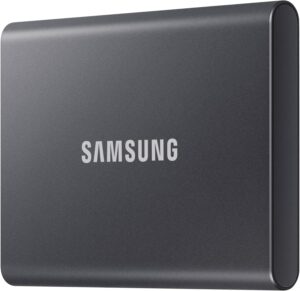 Samsung T7 1 TB external SSDFast, rugged pocket SSD to keep an offline copy of your site files and database at home. Unplugged, it is out of an attacker's reach.AmazonSee at Amazon
- TP-Link Deco X20 (pack of 2) Wi-Fi 6 mesh system AX1800Two units that cover a home with a single Wi-Fi network. Useful when one router cannot reach every room.AmazonSee at Amazon
- Anker Nano power bank 10,000 mAh 45 W with retractable USB-C cablePortable battery with a built-in retractable USB-C cable to top up a tablet away from a socket. Handy as a backup when the wall charger is out of reach.AmazonSee at Amazon
 Bitdefender Premium Security 2026 with unlimited VPN, 5 devices, 1 yearBitdefender's top tier, with a VPN with no data cap and a password manager. Useful if you manage your sites from public Wi-Fi.AmazonSee at Amazon
Frequently asked questions
Why does TikTok keep crashing?
TikTok has not confirmed any single cause. According to user reports, the first leads to test are an old version of the app, nearly full storage and a cluttered cache. Update TikTok, then clear its cache from Android settings, or from the app if the option is there.
How can I tell if TikTok is down?
Compare with other people: if TikTok does not work for them either, on other connections, the outage probably comes from TikTok’s servers. As a rough indication, also open tiktok.com in a browser to see whether the site responds. In that case nothing you do on your phone fixes it: wait for the service to come back.
Why can’t I like or follow on TikTok anymore?
The block may come from your account rather than the app. TikTok’s community guidelines forbid artificial engagement, and according to user reports TikTok temporarily limits accounts that like or follow very fast. Stop any follower service, take a break, then update the app.
Does clearing the TikTok cache delete my drafts?
Nothing on the official pages we consulted confirms or rules it out, so back up your drafts first. On Android, the Clear cache option in settings only removes temporary data. The Clear storage option permanently deletes all of the app’s data from the phone.
Why does TikTok not work on Wi-Fi?
If TikTok does not work on Wi-Fi but runs on mobile data, the problem is the connection, not the app. Restart your router, then reopen TikTok. If other devices in the home also load videos badly, the problem affects the whole network.
Share this content: