
Updated on November 8, 2026
This article contains affiliate links: if you buy through them, Wanda-techs earns a commission at no extra cost to you.
An MTN eSIM comes from the MTN branch in your country, and you install it by scanning a QR code on a compatible phone. The usual blockers are an incompatible phone, a QR code that has already been used, or no Wi-Fi during the download. Once you have the QR code, MTN Zambia quotes 2 to 5 minutes for activation.
Common symptoms and causes
- The QR code is rejected: it was already used, or it is lost.
- The eSIM stopped working after you changed phones.
- The line disappeared: the eSIM was deleted from the phone.
- The profile will not download: there was no Wi-Fi during installation.
- The phone refuses the eSIM: it is carrier-locked or not compatible.
Before you start
An eSIM is a SIM card built into the phone: instead of inserting a chip, you install a profile supplied by the carrier, usually through a QR code. MTN Nigeria, MTN Zambia and MTN Ghana publish an official eSIM page or help article. For MTN Cameroon, Ivory Coast, Benin and Congo, we could not read an official page, so check the conditions in those countries at an MTN store.
Gather these items:
- an eSIM-compatible phone that is not carrier-locked;
- your ID: the eSIM is registered like a regular SIM;
- a Wi-Fi connection to download the profile;
- the QR code or activation details MTN gives you.
Warning: never delete the eSIM from your phone. The profile can only be reinstalled with a new QR code from MTN, which means a trip back to a store. In Zambia, MTN also states that the physical SIM is disconnected as soon as the eSIM is activated, so the line works only on the eSIM.
Step 1: check that your phone supports eSIM
- Check your iPhone model: eSIM is supported from the iPhone XS, XS Max and XR onward.
- Dial
*#06#: according to unofficial guides, an EID number (the identifier of the eSIM chip) appears if the phone supports eSIM. - Have the compatibility confirmed at an MTN store: in Nigeria, the agent checks the phone’s eligibility before handing over the eSIM.
Your phone is ready once its model is confirmed compatible. Apple points out that the carrier must also support eSIM in your country.
Good to know: a phone locked to another carrier will not accept an MTN eSIM. If your phone no longer detects any SIM at all, read our guide SIM card not detected: how to get your network back.
Step 2: request the MTN eSIM in your country
The process differs from one MTN branch to the next. In Nigeria and Zambia, going to a store is mandatory.
- Go to an MTN store with your ID.
- Show your phone to the agent, who checks that it is eligible.
- Take the paper that carries the QR code, the SIM serial number and the PUK code (the code that unlocks the SIM).
- Keep that paper: if you lose the QR code, you have to return to the store with your ID and your number.
You leave with the QR code and no physical SIM card. Neither MTN Nigeria nor MTN Zambia publishes a price, so ask the agent.

MTN Nigeria
Registering the SIM with your NIN (national identification number) is mandatory. If you lose the QR code, MTN reissues it in store when you show your ID and your number.
MTN Zambia
You must go to a branch in person with your documents and a live facial capture. Prepaid customers go to a store too. After activation, top up your line.
MTN Ghana
According to a snippet of an MTN Ghana help article that we could not open, the request goes through a form sent to customer service or through the MyMTN app, under a “Get E-Sim” option in the More section. Delays of more than 72 hours are reported. This information still needs to be confirmed with MTN Ghana.
MTN eSIM in Cameroon, Ivory Coast, Benin and Congo
We could not read an official eSIM page for these countries. In Cameroon, an unofficial guide says the eSIM is requested at an MTN service center: check that point and the price at a store before you travel.
Step 3: activate the MTN eSIM on an iPhone
Warning: activation may disconnect your physical SIM (as MTN Zambia states). Do not delete the eSIM afterward, because you would need a new QR code issued in store.
- Connect the iPhone to a Wi-Fi network.
- Open the Camera app.
- Point it at the QR code MTN gave you.
- Tap the “Cellular Plan Detected” notification.
- Tap Continue.
- Tap Add Cellular Plan.
- Enter the confirmation code if the iPhone asks for one.
The iPhone then downloads the profile and adds the MTN plan. In Zambia, MTN counts 2 to 5 minutes for activation, followed by a top-up of the line.
If the camera detects nothing, go to Settings > Cellular (or Mobile Data) > Add Cellular Plan > Enter Details Manually and type in the details MTN gave you. When you set up a brand-new iPhone, pick the option to use a QR code. Since iOS 17.4, pressing and holding a QR code received in a message also offers to add an eSIM.
Good to know: the MTN Nigeria guide still mentions “Mobile Data > Add Data Plan”, an older iOS wording. On your iPhone, look for Cellular or Mobile Data. For an older model, see also how to activate eSIM on the iPhone 14 and older models.
Step 4: activate the MTN eSIM on Android
Menus vary by phone brand. One rule does not change: stay on Wi-Fi for the whole operation.
On a Samsung Galaxy
According to Samsung France’s help page, which we could only read in part, the path is as follows.
- Open your phone settings, go to the connections section and open the SIM card manager.
- Choose the option to add an eSIM.
- Choose the option to scan a QR code and point it at the MTN QR code.
- Restart the phone if the line does not appear.
The phone then adds the MTN line. If MTN gave you a code instead of a QR code, choose the option to enter the activation code.
On other Android phones
MTN Nigeria gives this path.
- Open Settings > Network & Internet > Mobile Network > Advanced > Carrier > Add Carrier.
- Scan the QR code MTN gave you.
The phone then adds MTN as a carrier. Menu names vary by brand and Android version.
If nothing works
A profile can only be reinstalled on another device after it has been deleted from the current phone. If the QR code was already used, you changed phones or the eSIM was deleted, go back to an MTN store for a new QR code.
Bring with you:
- your ID;
- your MTN line number;
- the phone on which you want to install the eSIM.
To move an eSIM from an Android phone to an iPhone, Apple refers you to the carrier, so contact MTN there too.
If your phone does not support eSIM and you are thinking of replacing it, here are three compatible models to compare.
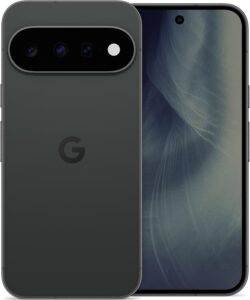 Google Pixel 11 256 GoSmartphone 5G de Google, écran 6,3 pouces, puce Tensor G6, 256 Go.AmazonSee at Amazon
- Samsung Galaxy S26 256 GoLe Galaxy S compact de 2026 : 167 g, puce Exynos 2600 en 2 nm, triple capteur photo et 7 ans de mises à jour.AmazonSee at Amazon
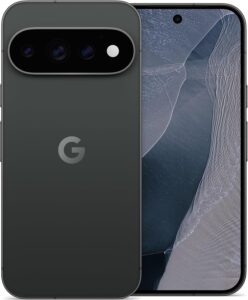 Google Pixel 11 Pro 256 GoSmartphone 5G de Google, écran 6,3 pouces, puce Tensor G6 et Gemini, 256 Go.AmazonSee at Amazon
Protect your phone: our selection
A few accessories to keep your phone secure and your data safe when you change device or eSIM.
 Bitdefender Total Security 2026, 3 devices, 1 yearSecurity suite for Windows, Mac, Android and iPhone. It helps protect accounts and files on your phone.AmazonSee at Amazon
- SanDisk iXpand Flash Drive Luxe 128 GB, Lightning and USB-C for iPhoneA flash drive with Lightning and USB-C connectors to copy photos and files from an iPhone. Also plugs into a computer to store the copy.AmazonSee at Amazon
- Anker Nano power bank 10,000 mAh 45 W with retractable USB-C cablePortable battery with a built-in retractable USB-C cable to top up a tablet away from a socket. Handy as a backup when the wall charger is out of reach.AmazonSee at Amazon
- Apple USB-C to Lightning cable, 1 mConnects a Lightning iPad or iPhone to a USB-C charger or computer. An Apple cable avoids charging faults caused by poor-quality cables.AmazonSee at Amazon
Frequently asked questions
How do you get an MTN eSIM?
In Nigeria and Zambia, you get an MTN eSIM at a store with your ID, where the agent checks your phone and hands you a QR code. In Ghana, a request by form or through the MyMTN app is reported but not officially confirmed. Elsewhere, ask at an MTN store.
How do you activate an MTN eSIM on an iPhone?
Scan the QR code with the Camera app, tap the “Cellular Plan Detected” notification, then Continue and Add Cellular Plan. The iPhone must be on Wi-Fi. If the QR code cannot be read, go to Settings > Cellular > Add Cellular Plan > Enter Details Manually.
Is my phone eSIM compatible?
On the Apple side, every iPhone from the XS, XS Max and XR onward supports eSIM. For an Android phone, have the model checked at an MTN store, where the agent verifies eligibility. The *#06# code, which would show an EID number on a compatible phone, is only mentioned by unofficial guides.
How much does an MTN eSIM cost?
MTN does not publish a price on its eSIM pages for Nigeria and Zambia. In Cameroon, an unofficial guide gives 100 FCFA, an amount MTN Cameroon has not confirmed on a page we could read. Ask for the price at a store before you receive the QR code.
Share this content: