
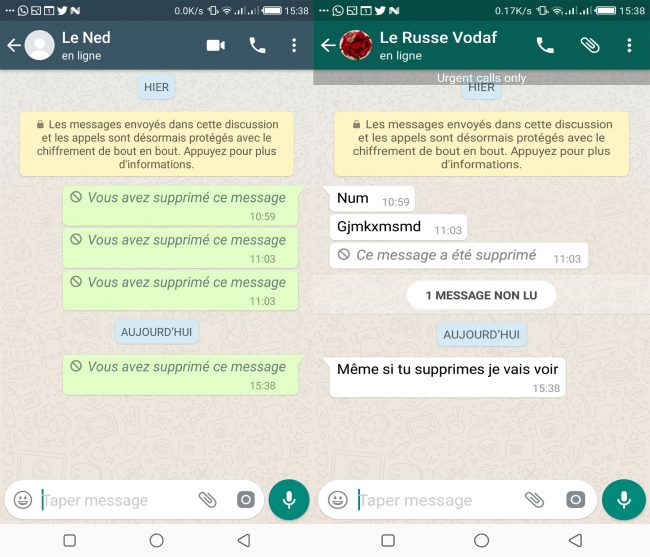
Hello friends, I hope you are all doing great today. As for me, I’m doing well .
How about learning something useful today? I’ve prepared a small tutorial to show you how to make sure that when someone sends you a message on WhatsApp, they can no longer delete it from your side. If they try to delete it, it will only disappear from their side, not from yours.
You know how it feels when someone sends you a message and then deletes it. When you ask them about it, they say “Oh, it was nothing” or “I sent it to the wrong person.”
We always end up curious about what was actually written.
To do this, we will use a more advanced version of WhatsApp that offers more features, called GBWhatsApp, which you can download by clicking here. I explain the whole procedure in detail in the video below. Don’t forget to subscribe to my channel and share your reactions or questions in the comments.
Enjoy the tutorial, friends
| Norton™ 360 Premium 2022 10 Appareils -1 An d’Abonnement Secure VPN – Password Manager – Dark web monitoring | ||
 | 20,99€ |  |
Video Summary
- Download and install the GBWhatsApp application.
- Open GBWhatsApp.
- Enter your phone number and confirm it.
- Just like with the regular WhatsApp, a verification code will be sent to you. Enter it in the verification field (in some cases it may be filled automatically).
- Allow the different permissions requested. Once this is done, we can configure our enhanced WhatsApp to see all the messages our contacts send us, even the deleted ones.
- Tap the three vertical dots at the top-right corner of your screen.
- Choose Privacy from the drop-down menu.
- A new menu will appear. Select Enable Anti-Revoke.
And that’s it! Now you won’t miss any messages sent by your contacts, even the ones they try to delete in your chats.
Share this content: