

Updated on November 7, 2026
This article contains affiliate links: if you buy through them, Wanda-techs earns a commission at no extra cost to you.
The DDR3 DDR4 difference comes down to voltage (1.5 V against 1.2 V), pin count (240 against 288 on a desktop) and the position of the notch, which stops you fitting one generation in place of the other. DDR5 goes further: 1.1 V and 4,800 MT/s at launch, against 3,200 MT/s at most for DDR4. Allow about ten minutes to identify your PC’s memory and pick the right module.
Common symptoms and causes
- You want to add or replace RAM but don’t know which generation your PC uses.
- The module you bought won’t go into the slot: its notch, called a key, doesn’t match the one in the slot.
- You mix up DDR4 and DDR5, because desktop modules of both have 288 pins.
Before you start
- Look up the memory generation your motherboard or PC takes, in its manual or on the manufacturer’s spec sheet.
- On a laptop, check that the RAM isn’t soldered to the motherboard: soldered memory can’t be replaced.
Warning: unplug the device from the mains before opening it, and never work on a device that is plugged in. On a laptop, also remove the battery if it is removable. The capacitors in some devices, such as power supplies, stay charged after unplugging: don’t touch them.
Warning: static electricity damages memory modules. Touch a metal part of the case to discharge yourself before handling the memory, or wear an antistatic wrist strap.
Warning: opening a laptop or a branded PC may void the warranty; check the warranty end date first. Never force a module into a slot it doesn’t match: you would damage the slot and the module.
Solution 1: the DDR3, DDR4 and DDR5 difference in numbers
| Generation | Voltage | DIMM pins (desktop) | SO-DIMM pins (laptop) | Speed |
|---|---|---|---|---|
| DDR3 | 1.5 V (DDR3L: 1.35 V) | 240 | 204 | DDR3-1600: 12,800 MB/s (unofficial source) |
| DDR4 | 1.2 V (DDR4L: 1.05 V) | 288 | 260 | up to 3,200 MT/s |
| DDR5 | 1.1 V | 288, different notch | not confirmed | 4,800 MT/s at launch |
MT/s, or megatransfers per second, counts the millions of data transfers the memory performs each second. The higher it is, the more data the module exchanges with the processor.
- Compare the voltage: 1.5 V for DDR3 (1.35 V in the low-voltage DDR3L version), 1.2 V for DDR4 (1.05 V in DDR4L) and 1.1 V for DDR5.
- Count the pins on a desktop module: 240 for DDR3, 288 for DDR4 and DDR5 alike.
- Compare the speed: DDR4 tops out at 3,200 MT/s, DDR5 starts at 4,800 MT/s.
You can now place a module by its voltage, pins and speed.
DDR3 vs DDR4: voltage, pins and bandwidth
DDR4 draws less power: 1.2 V against 1.5 V for DDR3. The low-voltage versions keep the same gap, 1.35 V for DDR3L and 1.05 V for DDR4L. On pins, desktops go from 240 to 288 and laptops from 204 to 260.
According to an unofficial hardware guide, a DDR3-1600 module reaches a peak bandwidth of 12,800 MB/s, against 25,600 MB/s for DDR4-3200. No manufacturer page we consulted confirms either figure.
DDR4 vs DDR5: speed and architecture
JEDEC, the body that defines memory standards, started work on the DDR5 standard in 2017. The first modules arrived in 2021, at 4,800 MT/s against 3,200 MT/s at most for DDR4, which is 50% more bandwidth; the standard allows for up to 6,400 MT/s.
Voltage drops from 1.2 V to 1.1 V. Kingston quotes about 20% lower power draw than an equivalent DDR4 module.
The inside of the module changes too. It carries its own power management circuit (PMIC), fed with 5 V on PCs and 12 V on servers, error correction built into the chips (on-die ECC) and an SPD hub, the chip that describes the module to the PC. Each module splits into two independent 32-bit sub-channels, for a bus that stays 64 bits wide.
Good to know: a desktop DDR5 module is 133.35 mm long and has 288 pins, like DDR4. To the eye, only the position of the notch tells them apart; their pin layout differs as well.
DDR and DDR2
DDR, sometimes called DDR1, and DDR2 came before DDR3. To find out whether your PC uses either, follow solution 3: the label or part number on the module gives the generation.
Solution 2: check that the RAM is compatible with the motherboard
- Find the notch, or key, on the edge of the contacts: its position changes from one generation to the next, and a module of the wrong generation won’t push into the slot.
- Don’t rely on pin count to tell DDR4 from DDR5: both have 288, but their pin layout and notch differ.
- With DDR5, check the module type too: the notch isn’t in the same place on a UDIMM and on an RDIMM. Take the type given in the motherboard manual.
- Buy the generation your motherboard accepts: according to an unofficial hardware guide, a motherboard takes only one.
- Note the maximum speed listed for your motherboard or PC: the BIOS and the platform set it, not the module, and a faster kit may run at a lowered speed.
A module of the right generation goes into the slot without force. One from another generation stops against the key.
Tip: if your motherboard is rated for a lower speed than the kit, there’s no point paying for faster memory. It will run at the speed the platform allows.
Solution 3: find out which RAM your PC uses
- Open Windows Task Manager, then the Task Manager > Performance > Memory panel.
- Note the speed, the number of slots used and the form factor (DIMM or SO-DIMM): according to user reports, not a Microsoft page, this panel shows them.
- Don’t take the displayed speed for the running speed: according to those same reports, it is the maximum speed the module advertises, not necessarily the one configured.
- If the generation (DDR3, DDR4 or DDR5) doesn’t appear, shut the PC down, unplug it and open the case following the precautions in Before you start. Then read the label or part number printed on the module.
To open the case without damaging the screws, here is a precision screwdriver kit.

iFixit Mako precision screwdriver set, 64 bits
A precision driver with an aluminium handle and 64 bits, including the flat blade to open a key case. The magnetic case keeps the screws together so none gets lost.
- AmazonSee at Amazon

The manual of the motherboard or PC, or the manufacturer’s diagnostic tool, also gives the generation and the speed supported. You then know the generation, the form factor and how many slots are still free.
Tip: photograph the module’s label before putting it back. You’ll need the part number when you buy an identical or compatible module.
Solution 4: choose between DIMM and SO-DIMM
- Take a DIMM for a desktop PC and a SO-DIMM for a laptop: that is the usual rule, so confirm it in the machine’s manual.
- Check the pin count of a SO-DIMM: 204 for DDR3, 260 for DDR4.
For DDR5 SO-DIMM, the sources we consulted disagree on the pin count: go by the label and the laptop’s manual. Before buying, read our piece on the rising price of RAM too. You now have the right generation and the right form factor for your machine.
If nothing works
If the PC no longer starts after a memory change, put the old module back. Then test the modules one at a time, in a single slot at a time. Our guide computer won’t turn on covers the other checks.
If the problem persists, check the manufacturer’s manual or take the PC to a repairer. Have the exact model of the PC or motherboard, the module part numbers and the purchase date to hand.
Take better care of your PC: our toolbox
A few accessories for anyone who opens, cleans or upgrades a computer.
- Belkin 4-outlet surge protector, 525 joules, 2 m, 2 USB portsPower strip with surge protection that shields chargers and devices from voltage spikes. Its two USB ports also free up a socket.AmazonSee at Amazon
- Keyboard and laptop cleaning kit, 11 piecesSoft brush, swabs and cloth for small gaps and dust. Handy for gently clearing debris from tiny ports and contacts.AmazonSee at Amazon
- iFixit Moray precision screwdriver set (32 bits)This case holds 32 precision bits, including Phillips and Torx, to open the battery cover and other small devices. The hardened steel helps avoid damaging the screws.AmazonSee at Amazon
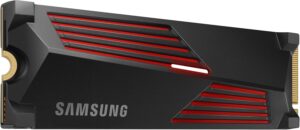 Samsung 990 PRO 2 To (avec dissipateur)SSD NVMe M.2 PCIe 4.0, jusqu’à 7 450 Mo/s en lecture, dissipateur adapté à la PS5.AmazonSee at Amazon
Frequently asked questions
Can you fit DDR4 in place of DDR3?
No, not in a motherboard built for DDR3. The notch on a DDR4 module is in a different place, and it has 288 pins against 240 for DDR3 on a desktop: it won’t push into the slot. Moving to DDR4 means a motherboard that accepts it.
How do I find out which type of RAM my PC uses?
Open Windows Task Manager, then the Task Manager > Performance > Memory panel. According to user reports, not a Microsoft page, you can read the speed, the form factor and the slots used there. If the generation isn’t shown, the label on the module or the PC’s manual gives it.
What is the difference between DIMM and SO-DIMM?
DIMM is generally fitted in desktop PCs, SO-DIMM in laptops. The two formats don’t have the same pin count: 240 against 204 for DDR3, 288 against 260 for DDR4.
Is DDR5 compatible with a DDR4 motherboard?
No. DDR4 and DDR5 modules both have 288 pins, but their pin layout and the position of the notch differ. A DDR5 slot rejects a DDR4 or DDR3 module, and DDR5 needs a motherboard built for it.
Share this content: