
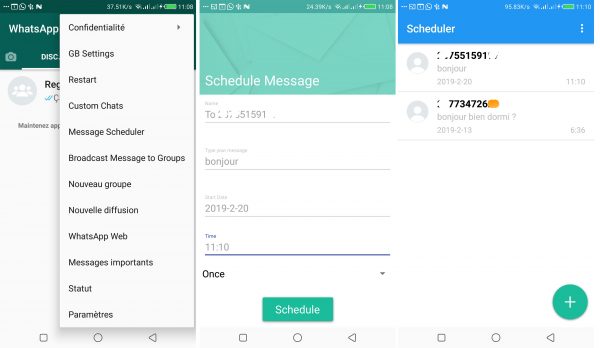
WhatsApp is one of the most used messaging applications in the world today and it offers a number of features that can be more or less limited depending on the user’s needs. There are “enhanced” versions that offer more features than the traditional WhatsApp and among these “enhanced” versions we can have YoWhatsApp, gbwhatsapp, and many others. The version we will use to plan our message sending is GbWhatsapp which you can download by clicking here.
| Norton Secure VPN 2023 for up to 5 Devices | |
 | 19,99 $ |
After downloading the application, you install it and follow these steps:
- Click the three buttons at the top right
- Click on “Message Scheduler”
- Then you click on the plus button and fill in the form when it is done you validate and the turn is done.
The person will receive the message you programmed the day you programmed and the time you programmed. That’s all friends! Below is the video that shows you visually how to do it and on those, my dear Potos I say to you very soon.
Find out :
- My VPN disconnects ceaselessly : these are the solutions
- How to install an iOS system on a Windows PC in 2022
Share this content: