
Updated on November 10, 2026
This article contains affiliate links: if you buy through them, Wanda-techs earns a commission at no extra cost to you.
To install an app on a Huawei without Google Play, start with AppGallery, Huawei’s official app store. Recent models sold without Google Mobile Services (GMS) do not ship with the Play Store, and that is the whole reason you are stuck.
Common symptoms and causes
- The Play Store is missing: recent Huawei models without Google services do not include it.
- Gmail, YouTube and Google Maps are not there, and they cannot be installed the way they can on other Android phones.
- The app you want does not show up in AppGallery.
- An installation from AppGallery stalls or shows an error code:
-2,-3,-22,-24,-25,-103,-110or-113.
Before you start
You need a stable internet connection and an up-to-date system.
- Open Settings > System & updates > Software update.
- Install the update if one is offered.
Warning: an APK file (the installation format for Android apps) downloaded from outside AppGallery can contain malware. Install it only from the developer’s own website or a source you know. Never from a link you received in a message.
Warning: a factory reset, suggested as a last resort for some errors, erases all the data on the phone (photos, messages, apps, accounts). Back it up first.
Step 1: install an app from AppGallery
- Open AppGallery. If it is missing from the phone, open
appgallery.huawei.comin the browser, tap Download and follow the on-screen instructions. - If a system warning appears, tap OK, then Continue installation.
- Search for the app in AppGallery and start the installation.
For a concrete example, follow our guide on installing WhatsApp on a Huawei through AppGallery.
If the installation stays stuck
- Delete the downloaded package in AppGallery > Me > Installation packages, or cancel the installation in Me > Install manager (the progress bar on the right of the app).
- Clear the AppGallery cache in Settings > Apps > Apps > AppGallery > Storage > Clear cache.
- Turn off PrivateSpace in Settings > Privacy > PrivateSpace, and any other users in Settings > Users & accounts.
- Restart the phone, switch networks (Wi-Fi or mobile data) and start the installation again.
This time the installation should go all the way through. If a code appears, it tells you where to look.
-2: invalid APK, or the app is already in PrivateSpace.-3: the phone runs Android 6.0 or an older version.-22: verification failed or a network problem.-24: leftover files; use the Optimizer app, update, or as a last resort back up your data and reset. A reset erases photos, messages, apps and accounts.-25: a newer version is installed under another user or in PrivateSpace.-103: the app is not compatible with the device.-110: update the system or, as a last resort, back up your data and reset. A reset erases photos, messages, apps and accounts.-113: the processor (32-bit or 64-bit) does not match the app.
Tip: write down the exact code before you retry anything. Huawei support will ask for it.
Step 2: look for the app outside the catalog
When an app is missing from AppGallery, the old route went through Petal Search. According to the previous version of this guide, it came preinstalled on the P40 and the Mate 40 Pro. We could not confirm its current availability or menus from an official source.
Good to know: an app found outside AppGallery installs as an APK file. Move on to step 3 and its precautions.
Step 3: install an APK file
Since Android 8, installing an app from somewhere other than the store is allowed app by app. So you grant the permission to the app that opens the file: the browser or the file manager. Menus vary with the EMUI or HarmonyOS version.
Warning: we have not checked this procedure against an official Huawei source. It relies on third-party sites, and the path may be different on your phone.
- Allow the installation of unknown apps for the browser or the Files app. Depending on the model, the option is in Settings > Security & privacy > More settings or in Settings > Apps > Special access.
Step 4: alternatives to Google apps
Gmail, YouTube, Google Maps and the Play Store are not provided on models without Google services. Their web versions still work in the browser.
The labels and the Phone Clone procedure below come from a Huawei support page that we could not read in full. They may differ on your phone.
- Open the browser and sign in to the web version of the service (Gmail, YouTube, Maps).
- To bring over apps from an old Android phone, open Phone Clone on both devices.
- Choose This is the new phone on the Huawei and This is the old phone on the old one, then scan the QR code.
- Tap Transfer.

Good to know: Phone Clone works without internet. A Huawei support page says it needs Android 7.0 or later, and not every app is necessarily transferred.
As for GSpace and other third-party tools that promise Google services, we found no official source on how they work or whether they are safe. There is no guarantee they will work.
If nothing works
Banking and payment apps that rely on Google services are not guaranteed on these models. If AppGallery still blocks you, contact Huawei customer service for your region with:
- the name and version of the app;
- the error code or a screenshot;
- the system version and the AppGallery version;
- your country or region.
Warning: a factory reset erases all the data on the phone. Back it up before you start.
If the app you need stays out of reach, an Android phone with Google services is the simplest answer. Here are three recent models to compare.
- Xiaomi Redmi Note 15 Pro 5GSmartphone Xiaomi Redmi Note 15 Pro 5GAmazonSee at Amazon
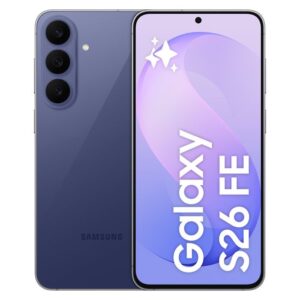 Samsung Galaxy S26 FE 128 GoSmartphone 5G de Samsung, écran 6,7 pouces, 128 Go de stockage.CdiscountSee at Cdiscount
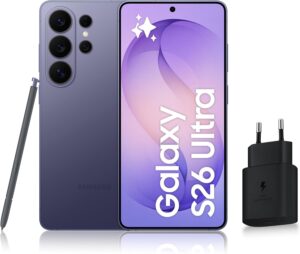 Samsung Galaxy S26 Ultra 256 GoSmartphone 5G haut de gamme de Samsung avec Galaxy AI, 256 Go, version française.AmazonSee at Amazon
Protect your Huawei: our selection
Here is what helps protect the phone, back up your data and keep it charged.
- Bitdefender Total Security, 1-year licence for 3 devices (Android, iPhone, PC, Mac)Scans the phone for malicious apps and protects against phishing, on Android and on iPhone. Useful if a suspicious app is behind the sounds or the fake alerts.AmazonSee at Amazon
- SanDisk Ultra Dual Drive Go 128 GB, USB-C and USB-A flash driveUSB key with two connectors, for a computer or a phone. Handy for carrying files or a software update.AmazonSee at Amazon
- Anker Nano power bank 10,000 mAh 45 W with retractable USB-C cablePortable battery with a built-in retractable USB-C cable to top up a tablet away from a socket. Handy as a backup when the wall charger is out of reach.AmazonSee at Amazon
- Anker 310 USB-C to USB-C cable, 0.9 mShort USB-C to USB-C cable from a recognised brand, handy to replace a worn cable. Also useful to test whether the cable is the cause of a charging problem.AmazonSee at Amazon
Frequently asked questions
How do I install apps on a Huawei without Google Play?
Use AppGallery, Huawei’s official store, as described in step 1. If it is missing from the phone, download it from appgallery.huawei.com in the browser. For an app that is not in the catalog, the APK file remains, with the precautions from step 3.
Can you install the Google Play Store on a Huawei?
No, not through an official route: the Play Store is not provided on Huawei models without Google services. Gmail, YouTube and Maps remain usable as web versions in the browser.
How do I download an app that is not in AppGallery?
You then have to install its APK file, preferably from the developer’s website. Petal Search was used to find it on the P40 and the Mate 40 Pro, but we could not confirm how it works today. Follow the precautions in step 3.
How do I install an APK file on a Huawei?
Allow the installation of unknown apps for the browser or the Files app that opens the APK; the menu changes with the EMUI or HarmonyOS version. We have not checked this procedure against an official Huawei source: it relies on third-party sites. Pick a safe source, because an APK can contain malware.
Is GSpace safe?
We found no official source confirming that GSpace is safe. Before you enter your Google credentials in it, weigh that risk and prefer the web versions of the services.
Share this content: